This is just a suggestion, but maybe you could add some sort of FMV intro in the CD32 version? Like the one from Castlevania Chronicles on PS1, I don't think it'll take up too much space
FMV support is not available yet (was dropped IIRC) but as Earok is a fan of FMV games (e.g. Road Avenger conversion) I'm sure it'll be available at some point.
Thank you very much! Still some issues on real Amiga hardware (e.g. the use of third party USB adapters for modern pads into Amiga's DB9 port) but it's being solved.
Well spotted (screenshot on EAB), thanks, I should fill that gap that you pointed out in the map. I got way critical priorities on the queue right now regarding 3rd party controls on real hw. But the issue is added to the report list, thanks for your post.
Also, worth mentioning that the goal was to provide a playable version of the original Castlevania but with an Amiga flavor. Not a port of the Sharp X68000 or PlayStation "Castlevania Chronicles" game, it only happens to use a bunch of level tiles and sprites from that game.
I hoped that at some point I would be able to get rid of all assets remaining of that X68K game, like what Amiga's Rastan wonderfully did (Amiga assets tailored for Amiga specs). Or the new Sonic GX game for Amstrad Plus/GX4000, which is not Mega Drive, Master System or Game Gear version, but something that was tailored to play to the strengths of the machine in question. ;)
I've tested and it fully works on my A500-Mini. Check video at the end of this post. I recommend that you don't rename it from the original scorpion_dev.lha name. Also, you should do the config below, which tells your mini to use AGA chipset, among other things.
1. Copy scorpion_dev.lha to your Amiberry device into THEA500-Games\ 2. Copy the following lines into THEA500\whdboot\game-data\whdload_db.xml after the whdbooter element is opened (should be line 2):
Hello Dante, I tested the actual release but I don't know if the previous update has also the same issue, if a CD32 pad is wired to my A1200/030 I can move the menu cursor through START and OPTION but no buttons is recognized. If I force my CD32 pad to acts as a 2 Button gamepad then the menu works as due. The Joypad CD32 is a KTRL, but I tested the KTRL Plus too. Both work and tested with JoyPortTest 0.3 on Aminet. Thanks for your support.
I'm working on it, as seem by the thread below with Pascal De Maeseneire. Earok did a new version of the engine to account for these button issues. The buttons worked after the new version, but it apparently added a new set of glitches to the game itself, which was previously fine.
I typically stay on a version of the engine that I can label as "stable" for as long as I can go, because changing engine version has proven in the past to add new glitches in other areas derailing the actual game development. When the time is right, I take a deep breath and change the version of the engine, which means a new dev cycle spent testing everything head to toe and fixing the new issues that appeared. But I did a new branch on this new one, so expect some news soon.
Thank you very much for you and Pascal for your reports and to bring to us this issue of pads w/ more than 2 buttons being used on an A1200
Here it goes, a preliminary version with the new version of the engine, attempting to solve the fire button. The attract/demo scene mode crashes under the new engine, so it's temporarily removed (it does the cutscene intro then loops back to title screen menu, skipping the troubled scene). But if the button works and you can play, that's a step in the right direction: https://www.mediafire.com/file/lc2sxjkbl34uiqh/CastlevaniaAGA_WHDL_Nov6.lha/file
I just gave the new CD32 release a try, I got a game over during the Medusa fight and the game randomly soft locked in a weird way 😂 Also, the game crashed and showed me this error at the start of level 6
I increased the breach limit from 48 to 64 (based on your screenshot) . The more it's increased, the more memory it consumes, so it must be done gradually. The medusa should be fine too now, please try again (I've just uploaded the updated ISO).
Ok, the 'asset ZZ6' code on your screenshot means that a map asset wasn't fitting in memory (due to fragmentation). The course of action was unload all asset bundles between stages, according to the guide and advice on the engine's Discord.
I gave it a shot, please try again (updated ISO). At the moment, I unloaded the assets between levels 5 and 6, because it's where the memory is getting fragmented to the point that the asset isn't loading. But I will ask there if it's recommended to do that between all the levels, which I'll do if the problems persists. Thanks again.
Here it works directly after reboot, I mean, if I run something else before (like Dopus for example), then it fails to run. Memory got fragmented. FBlit program on startup-sequence used to help a bit.
This is also a good gauge - the amount of RAM that the Amiga CD32 version uses: "Accounted memory total: 1841882"
That version works on the stock machine so that is about the amount needed. But the CD32 has no Workbench booting up and getting in the way, so that's part of what makes it possible.
Hi Many Thanks for Your report... I Hope that the creator of the scorpion Engine will find a solution with that adaptator because Your game is verry Nice... This adaptator USB to DB9 is compatible as CD32 PAD. I used the latest WHDLoad 19.2 and the slave included in Your Package.
Edited :
The problem is not due to the Slave or WHDLoad because with your alternative version, when launching the Game file, I get the same problem when the TOM+ is present... the fire button has no effect on the start menu. Your Latest version (02/11) didn't change anything.
Earok did a tweak on the engine to attempt to make it more compatible to third party joystick adapters, here's the link for a new test version of the game:
Many thanks for Your answer and Your Fix... Now all works correctly with a 3rd Fire button...
It works perfectly with my PAD Logitech F310.
I am really happy that the third fire button will be available on all future versions of the Scorpion.
1) There is a problem with the Intro... The intro Start correctly but on the 2nd screen, The text scrolling speed fluctuates, The text on the screen appears to be flickering and the sound becomes less consistent, then the screen goes black and nothing happens, without returning to the game's demo mode... which allowed launching the game using the Fire button. After this problem, I have to reboot my A1200. My setup is A1200 GVP A1230 Turbo+II @40 MHZ + FPU with 32 MB Fast Ram.
Tests were also carried out under WinUAE 6.02 Beta 5 (64 Bits) with the same GVP A1230 Turbo+II card (emulation) and the same results were obtained.
2) Under WHDLoad (Slave included in the archive) about the QuitKey function: it's stopped working again. As QuitKey, I used QuitKey=$46
I also take this opportunity to congratulate you on the very high quality of your Scorpion engine.
Thanks for the report. Glad now that your Tom+ adapter now works. Can you please check if the text scrolling speed fluctuation happens with the LHA build too or only the WHDLoad? It was also happening in the previous version of the game that didn't supported your adapter or is this a new issue? Thanks again.
ECS, if you mean as 1.5 or 2MB chipRAM A500/A600, then it's not impossible.
But OCS as in A500 512K chipRAM, then it's quite a problem: back then we had great looking games for it but people complained they lacked depth/gameplay.
Memory was such a bottleneck that sometimes they weren't able to even fit in-game music, let alone some varied and complex levels and bosses. CV AGA soundtrack alone is nearly 1MB, MOD music takes a lot!
It's the engine's default output, I don't have access to change. It's well known how fiddly Amiga emulation is to get right, but Inglebard was able to record/play it properly after a ton of tinkering:
I did a new emulator config with another way for remapping commands (native emulator mapping is Right Ctrl for fire button and something else non-standard, that's why I did the remap which may cause lag). Try downloading again, it might be improved in that area with the changed config file. It's on CastlevaniaAGA_Win64\FS-UAE\Configurations\Default.fs-uae so you can edit and alter mapping if you use a controller and want other button maps etc.
About Genesis, I was told (by contact working for the IP holders) that, as long as it's on a niche system like Amiga, I'll be fine. If it goes to modern PC or even the popular Genesis, there could be legal scrutiny. New Genesis games are made into cartridges by the Chinese to be sold by the thousands at AliExpress, so, money involved = big problem. But, I could do a Genesis game with original IP using this codebase or parts. ;)
> But, I could do a Genesis game with original IP using this codebase or parts. ;)
I'm interested in this.
But, well, Konami isn't TOO strict... There's odd cases, like that one guy in Canada who sells his fangame remakes and claims to have Konami's permission to do so, or the case of the Castlevania Unreal remake that got hit with C&D (though Konami later lifted it to allow the dev to update it as long as he doesn't add content), overall they don't mind fangames.
Works on my A4000/030 now with October update :D Nice game with great gfx , very good music and sfx. Have some slowdowns when it get crouded or there are big objects. Seams like this game might require 50MHz or something to play smooth all the time. Maybe a 25hz option for slower hardware? I also wish 2nd button could be used for special weapon. That way up would be for jump but that is what I like anyway.
Thanks! Glad to hear that it works on A4000 now. That's a neat suggestion about 2nd button, I did this quick version for testing. If you enable up for jump on the menu, the second button automatically defaults to special weapons:
About speed, for the stock CD32 at ~14MHz it's using a method that adds performance/extra bandwidth but in exchange you get the screen off center.
You may see many Amiga games from back then (Fire & Ice AGA) or recent (BD vs Dragon Ninja AGA) with off center picture. I personally prefer some slowdown here and there - even NEO GEO games have, it's part of the experience - than oddly off center screen. :) But here goes another version for such testing w/ the method enabled:https://www.mediafire.com/file/qgwd1v0w2mnsm9x/CastlevaniaAGA_WHDLoad_offcent/fi...
Thanks :D So much better to play now with 2nd button for special weapon. The off center version is for sure faster but seams more buggy on my A4000. Got a whd-load error after dracula boss fight.
I think I fixed the Dracula issue. Because the game was reloading that level 2x after player respawn. Also yesterday I improved the hitbox on Dracula's head (was way off), so you might want to download main version once again. It may be too easy to hit Dracula now... so hard to balance. Anyway, here goes the "off center" faster version with Dracula fixes: https://www.mediafire.com/file/vhph7kc4jws3boz/CastlevaniaAGA_WHDLoad_offcent/fi...
Thanks! Testing now. Problem, nothing really new but using 2nd button it suddenly stop working. If I quit and look in the menu I can see the controlls changed. When I first play I select up for jump and other options off. I will try dracula level after dinner.
Dracula fight works good now :) There is a problem with how the action buttons work. 2nd button for special weapon but 1st action button also enable special weapon. I made a video so you can see.
This is strange : the last version doesn't recognize my pad buttons (this is a KTRL CD32 one). On the screen menu I can move the cursor but it doesn't recognize any fire button. I had no problem with past versions.
Hello Dante. Earok have been asked about the bug on eab. He investigated the engine and fixed a couple of them. Maybe it could benefits your great game ?
hi, did you released a new version of the game for the Amiga mini and emulators too or only for Amiga CD? If you releases an amigamini version too, please can you provide the link? thanks!
I have some problems with Your latest WHDLoad version (15/08) on real Hardware... at The Start screen the fire button doesn't works and I have a screen error write in Red. With a previous version I didn't Had this problem... Could someone can confirml this problem. Under WinUAE I don't have the problem.
It did finally worked for user 'gmeista' here in the comments below (real hardware, A1200/TF1260) but then it stopped working for you... It was a long thread but I suggest the NOMMU tooltype trick which may play a role in making it work on real hardware (specially on MMU-equipped accelerator cards, it seems). Alternatively, you could get rid of those Preload ones (it helps on certain setups).
I've never played any of the castlevania game but this has made me want to jump in. It's a fantastic achievement and good to see AGA hardware getting some love.
Regarding the controls, the shoulder button doesn't seem to work. I'm running it via an emulator but I tried the controller test on Metro Siege (demo) and all the buttons are mapped correctly.
Regarding the shoulder button, I just checked, it's mapped it seems (screenshot of editor/controls mapping attached). It's also mapped to CD32 green button too, just in case.
If you tried FS-UAE (PC version), the controls mapping could vary indeed. In that case, you can go to \CastlevaniaAGA_Win64\FS-UAE\Configurations\Default.fs-uae and change accordingly (where joy_1_fire_button is attack, action_key_z is jump and action_key_space is sub-weapons).
This is probably low chip RAM, happened on AmigaBill's stream last weekend (I think he has TF1260 card too). What he did was to lower the Workbench to 4 colors or similar, to free chip RAM.
It worked for him, but the only way to make sure is to unarchive the *LHA* version onto the SD and run game.exe through the boot without startup method (there's a mini "tutorial" for that below the download links). Thanks.
Hi I'm trying this, but game.exe doesn't work. it is an unknown command. There doesn't seem to be a game.exe file in CastlevaniaAGA.lha, only CastlevaniaAGA, cartridge.se, and CastlevaniaAGA.info
OK thanks, I tried this now, I get the Scorpion Engine logo, then a loud "beep" tone that does not stop! This is the same whether I load game.exe or game-crunched.exe
thats such an awesome work you did so far , just one question ..when you done with the amiga version .... any plans to port it to one of the other systems that handles the scorpion engine ? or wouldn't that be possible ? it seems to be a pretty intressting retro engine for that reason alone
Thanks, it's always a possibility. I also got other projects that may target primarily the other platforms covered by SE (NG, MD). Such as one that I was doing in SGDK long ago. As a rule of thumb, it's always better to make a game 100% tailored towards a certain system, because they have all their different pros and cons. Even with modern tools helping, to make multiplat tend to lower the bar for both, as the result is an average between both systems. Rather than one that exceeds in one system.
sounds great and sure the games should be optimized for each system ...you can be sure i follow your stuff ..that castlevania version is just getting better with each version
Hopefully, after everything is sorted out in the standard version (which is still in "quarantine", so to speak). Updating both versions at the same time led to undesirable results.
Sure! For example, the music isn't complete yet - Out of Time (world 6) is missing 2 patterns at end, among other small things and missing hidden items on the levels.
Thank you again for this gift for Amiga's 40th anniversary. This game is one of the best things the Amiga AGA has to offer. Keep making us dream. My current passion is creating video game icons, so I just have to create this one.
Looks fantastic, thanks! I've received many icons along this development cycle so I need to add a directory in future releases with all of them, as a fair move. I can't pick one and use as the default icon for the game because I may be accused of favoritism. :-D
CastlevaniaAGA.lha - Try this one if you're getting an error on the WHDLoad vers
I'm getting back to you about the latest lha published on 07/25 with the files at 8:31 p.m.
If we integrate these files into an existing WHDLoad installation (your) by renaming the CastlevaniaAGA file (210,140 bytes) in the DATA directory to load_whd and then launch your WHDLoad slave, in that case the QuitKey no longer works. Will You update Your WHDLoad installation too ?
Edit: I just followed your suggestion and it worked, so I've updated the WHDLoad one in this site. Thanks!
Some extra info:
The issue was reported first by Todd Gill, using an A1200 + TF1260 card.
I can reproduce the error in UAE with the "Fastest as possible" option enabled (screenshot). It occurs right at start after you double click on its WB icon.
But if I use "Approximate A500/A1200 or cycle-exact", with Cycle-exact (full) and Cycle-exact enabled in Chipset tab, the game loads and works correctly.
Thanks. Beautiful video quality, keep up the great work! EDIT: Btw, noticed a minor issue (03:15 of vid), end of stage panel should look like screenshot below. What was config used for recording?
This version finally fixes the crash issue in World 5 and looks even better. The music has also been reworked. We've adjusted our rating accordingly. This game deserves nothing less than the highest rating. 👍
Thank you very much! Your tests were important for solving that issue. I've updated the status from alpha to beta (about version 0.95) here on this site. I'll be still working on it towards version 1.0 (still a few edges to polish).👍
The development of this game is excellent...
You take the time to refine it...
It's perfect... I play regularly with your Updates.
I watched the video with the graphic improvements (Table, Color of the candle flame, ...)
It's excellent and very fluid.
It seems to me that at the end of level 2 on the last staircase before level 3 that the character was swinging before moving on to level 3
but it may be just an impression.
Thank you for this development to make us a PERFECT version...
after a Green Beret that we ALL review on our Amiga.
Thanks again,
Pascal
Thank you very much for your words. I've updated its status from alpha to beta, among other things. For gold/release, I'd like to add modifications to the intro screen, final versions of the music (IM76 told me that the final boss music still uses placeholder instruments and DJ Metune's Out of Time track is still missing 2 patterns), refinement to enemies' behavior and more performance optimizations.
Hello. Just tried the WHDLoad version on an A1200 3.1 - 030/50
On the 3rd lever, as I spawned, it just took me to the most left end of the level. A jumping skeleton was there on the wall. I was invisible but could through some daggers with space. Couldn't do something else.
Try pressing F3 on keyboard to reload the level if that happens. The camera 'unfollow' player and goes to position ~0,0 on the map, it's a known issue. That issue isn't happening anymore on my internal version running on SE 2025 and I plan to update to that one end of next week if all goes well. Thanks!
Yes, I'm working on getting it on Scorpion 2025. The main reason is to solve the CD driver issue that plagues CD32 version, but many other improvements will be seen in next update, such as better color conversion shown below (through in-game palette swap). Thanks.
I tried both WHDload and HDD version and the game crashes at level 5. I use WinUAE.At startup I have 1936928 bytes of Chip RAM and 128MB Fast RAM free.
Try the version below, it's running on a newer version of the engine that enables more entities on a level (that level is too crowded and breaches the older engine's limits). But it also has new issues on other areas. I'm working on it. Thanks!
I just ran several tests with the CD32 version. Since I have a TF330, I also tried the version you made specifically for it. I couldn't finish the game once with either version: Generally, the Fastram version allows for better stability in terms of music, but crashes 2 out of 3 times after the second boss. (Black screen and you hear the victory music on a loop). The "classic" version has a lot of music issues and often crashes when you enter the second boss's room. There are also a lot of graphical glitches after you die. And I also noticed that the "forward" button on the controller, which allows you to throw objects, throws them when you press it (normal) but also when you release the button (strange). There you go :)
Thanks for reporting. This is probably due to RAM, because as a challenge, I tried to shove a ~3MB game into a 2MB machine. :)
The TF card helps, but it seems to bring other engine-related issues (as I've watched similar reports from the other Scorpion Engine CD32 game released, SW Holiday Special).
Well spotted about the weapon fire on button release, it should be fixed in the build below. I also disabled preallocate memory to see if it helps with the stage crashes/black screen. And added a cheat to help your testing: "green" on CD32 pad will fill your health bar when pressed:
The visual glitches and non-playing CD music are engine related. Similar issues were reported on SW Holiday Special released by the engine's author himself. All I can do is to switch engine versions until it's mitigated or solved. Meanwhile, I did the version below using a different version of the engine, to fix a problem that appears on world 5 (it worked). It is not CD32, just normal A1200, but you can play that as well if you have a TF card on your CD32. Thanks.
Hi, could you please include most of the soundtrack of Castlevania of Sharp X68000. It seems to me very inconsistent the music style that has the game. The first stage song is taken from the X68K version, but from the following stages they have a soundtrack whose music style does not match with the first stage.
Hi, not sure if you're talking about standard version or CD version. Standard version is incomplete atm, music-wise.
However, the CD version can be modded, so you can download your favorite Castlevania tracks and do a replace-and-rename job in its folder to create your own custom playlist. The current track list is described in this post.
It supports MP3, WAV and FLAC formats (but you have to edit the CUE file accordingly, check screenshot below). If you use emulator, make sure to load it by the cue file, otherwise it'll ignore the CD music. If you burn a CD to play on real console, make sure that the burner you use supports the music format that you gonna use (people recommend ISO Burner which is free, and to burn at slowest speeds).
Ok, but please check how the standard version rendition of Wicked Child sounds and how it sounds on the Sharp X68000 - it's quite accurate to me.
Only about 3 main songs are actually "real" on standard version: Vampire Killer, Stalker and Wicked Child. Stalker isn't on the X68000 (you won't find a way to compare). Walking on the Edge, Out of Time and the others are placeholder, until DJ Metune (new musician) finish them. This takes a lot of time to do and require special knowledge because the Amiga has only 4 channels while the X68000 has 8 FM channels + 1 ADPCM. The Amiga costs $599 at launch while X68000 costs $3000 - different price ranges for different market niches. Thanks.
Hey Dante! Trying to get Castlevania AGA running on an Android, using Retroarch. I cannot seem to get the music running. Using PUAE core. Any suggestions? Really cool game.
I assume you're trying the CD version, so there is this post on Reddit. But I also recommend to get the standard version (Castlevania AGA HDF which is probably the simplest on RetroArch, because I've read that WHDLoad and LHA versions need extra libs). To get CD music going on emulation is really tricky, not all emulators have full support for CD games and I have experience only with WinUAE and FS-UAE. The standard version uses Amiga PCM chip music instead and should work without hassle. Thanks for the message and have a great Sunday!
It's already compatible with FLAC tracks. Both MP3, WAV and FLAC already work (on emulation). If you have a FLAC track in hand, you can do the following:
drop it in the game's folder together with the other tracks. Rename cdaudio_track_6.mp3 to track_6_original.mp3 or something else to keep it.
Rename your new FLAC track to cdaudio_track_6.flac and edit the .CUE file (with Notepad or similar) to reflect the picture below. Save and test (track 6 is actually the intro). The whole track list (track names and what they are) can be found here.
About the real console, the burner software is key. The CD32 supports only Redbook CD tracks: MP3, WAV and FLAC are converted to Redbook when burned to disc. So, if your burner software supports FLAC, it should burn to Redbook and works.

← Return to game
Comments
Log in with itch.io to leave a comment.
This is just a suggestion, but maybe you could add some sort of FMV intro in the CD32 version? Like the one from Castlevania Chronicles on PS1, I don't think it'll take up too much space
Absolutely!
FMV support is not available yet (was dropped IIRC) but as Earok is a fan of FMV games (e.g. Road Avenger conversion) I'm sure it'll be available at some point.
This conversion is superb in every way....your work is very appreciated.
Thank you very much!
Still some issues on real Amiga hardware (e.g. the use of third party USB adapters for modern pads into Amiga's DB9 port) but it's being solved.
Hopefully this gets your attention?
https://eab.abime.net/showthread.php?t=109885&page=3
Well spotted (screenshot on EAB), thanks, I should fill that gap that you pointed out in the map. I got way critical priorities on the queue right now regarding 3rd party controls on real hw. But the issue is added to the report list, thanks for your post.
Also, worth mentioning that the goal was to provide a playable version of the original Castlevania but with an Amiga flavor. Not a port of the Sharp X68000 or PlayStation "Castlevania Chronicles" game, it only happens to use a bunch of level tiles and sprites from that game.
I hoped that at some point I would be able to get rid of all assets remaining of that X68K game, like what Amiga's Rastan wonderfully did (Amiga assets tailored for Amiga specs). Or the new Sonic GX game for Amstrad Plus/GX4000, which is not Mega Drive, Master System or Game Gear version, but something that was tailored to play to the strengths of the machine in question. ;)
Please, can you share the updated version for AmigaMini too? thank you!
Sure, here it is:
https://www.mediafire.com/file/mkqkeh6swqlo5hp/scorpion_dev.lha/file
thank you!
Hello i have this Mini Version from the Link on my Amiga 500 mini.Game Not Startet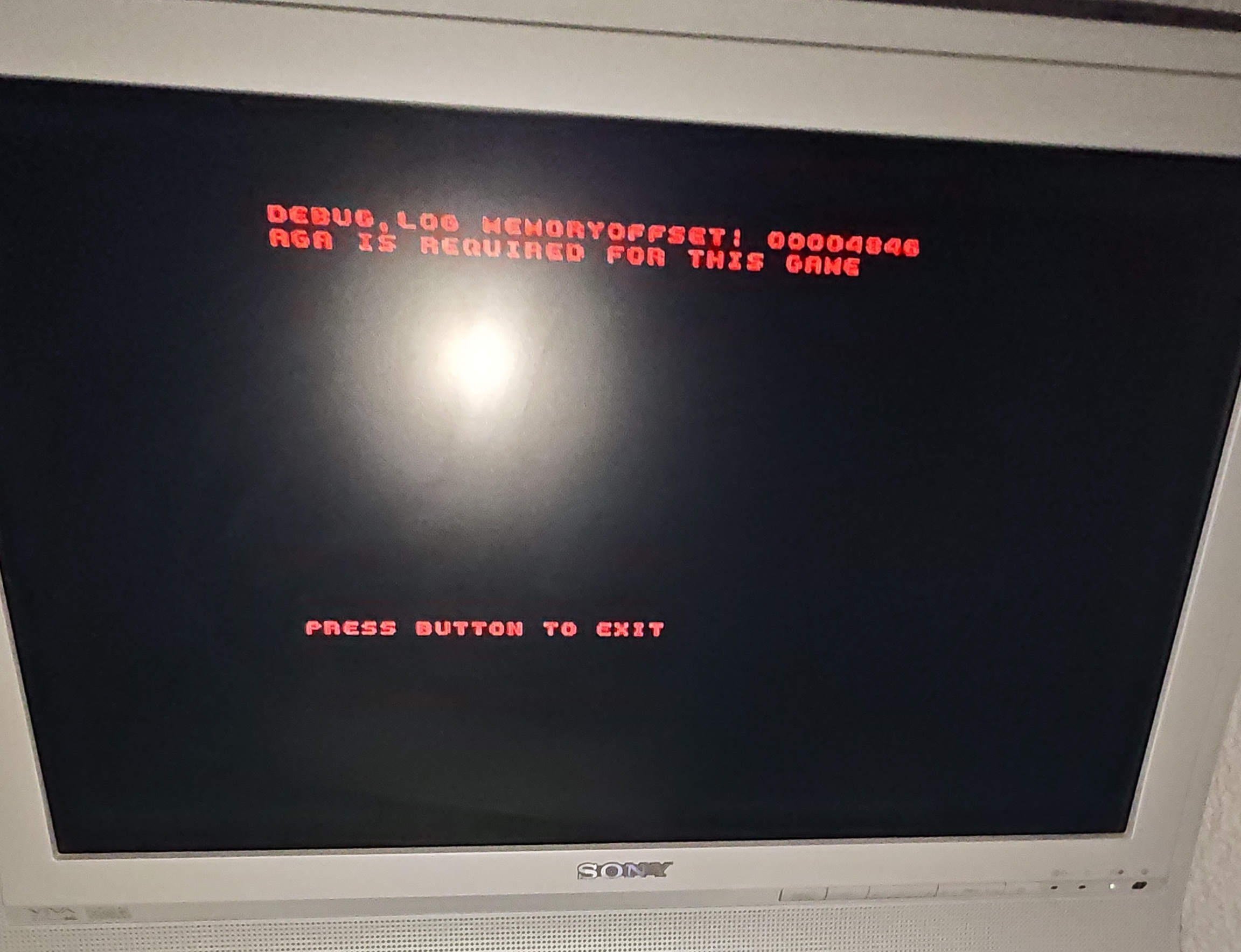
It says "AGA is required for this game" (e.g. Amiga 1200/Amiga 4000).
My A500 mini runs AGA games, not sure what is going on with your mini. It's supposed to run Amiga 1200 games, despite the name.
Hi.I have Firmware 1.2.1
I've tested and it fully works on my A500-Mini. Check video at the end of this post.
I recommend that you don't rename it from the original scorpion_dev.lha name. Also, you should do the config below, which tells your mini to use AGA chipset, among other things.
1. Copy scorpion_dev.lha to your Amiberry device into THEA500-Games\
2. Copy the following lines into THEA500\whdboot\game-data\whdload_db.xml after the whdbooter element is opened (should be line 2):
<game filename="scorpion_dev">
<name>Scorpion Dev</name>
<subpath>scorpion_dev</subpath>
<slave_count>1</slave_count>
<slave_default>scorpion_loader.slave</slave_default>
<slave_libraries>False</slave_libraries>
<slave number="1">
<filename>scorpion_loader.slave</filename>
<datapath>data</datapath>
</slave>
<hardware>
PRIMARY_CONTROL=JOYSTICK
PORT0=JOY
PORT1=JOY
FAST_COPPER=FALSE
JIT=FALSE
CHIPSET=AGA
SCREEN_AUTOHEIGHT=TRUE
SCREEN_CENTERH=SMART
SCREEN_CENTERV=SMART
</hardware>
</game>
Hello Dante, I tested the actual release but I don't know if the previous update has also the same issue, if a CD32 pad is wired to my A1200/030 I can move the menu cursor through START and OPTION but no buttons is recognized. If I force my CD32 pad to acts as a 2 Button gamepad then the menu works as due.
The Joypad CD32 is a KTRL, but I tested the KTRL Plus too. Both work and tested with JoyPortTest 0.3 on Aminet.
Thanks for your support.
DanyPPC,
I'm working on it, as seem by the thread below with Pascal De Maeseneire. Earok did a new version of the engine to account for these button issues. The buttons worked after the new version, but it apparently added a new set of glitches to the game itself, which was previously fine.
I typically stay on a version of the engine that I can label as "stable" for as long as I can go, because changing engine version has proven in the past to add new glitches in other areas derailing the actual game development. When the time is right, I take a deep breath and change the version of the engine, which means a new dev cycle spent testing everything head to toe and fixing the new issues that appeared. But I did a new branch on this new one, so expect some news soon.
Thank you very much for you and Pascal for your reports and to bring to us this issue of pads w/ more than 2 buttons being used on an A1200
Thanks to You ;)
Here it goes, a preliminary version with the new version of the engine, attempting to solve the fire button. The attract/demo scene mode crashes under the new engine, so it's temporarily removed (it does the cutscene intro then loops back to title screen menu, skipping the troubled scene).
But if the button works and you can play, that's a step in the right direction:
https://www.mediafire.com/file/lc2sxjkbl34uiqh/CastlevaniaAGA_WHDL_Nov6.lha/file
Works like a charm !
Many thanks :)
After defeat Boss level 1 the game doesn't load level 2, the screen stays simply black.
I just gave the new CD32 release a try, I got a game over during the Medusa fight and the game randomly soft locked in a weird way 😂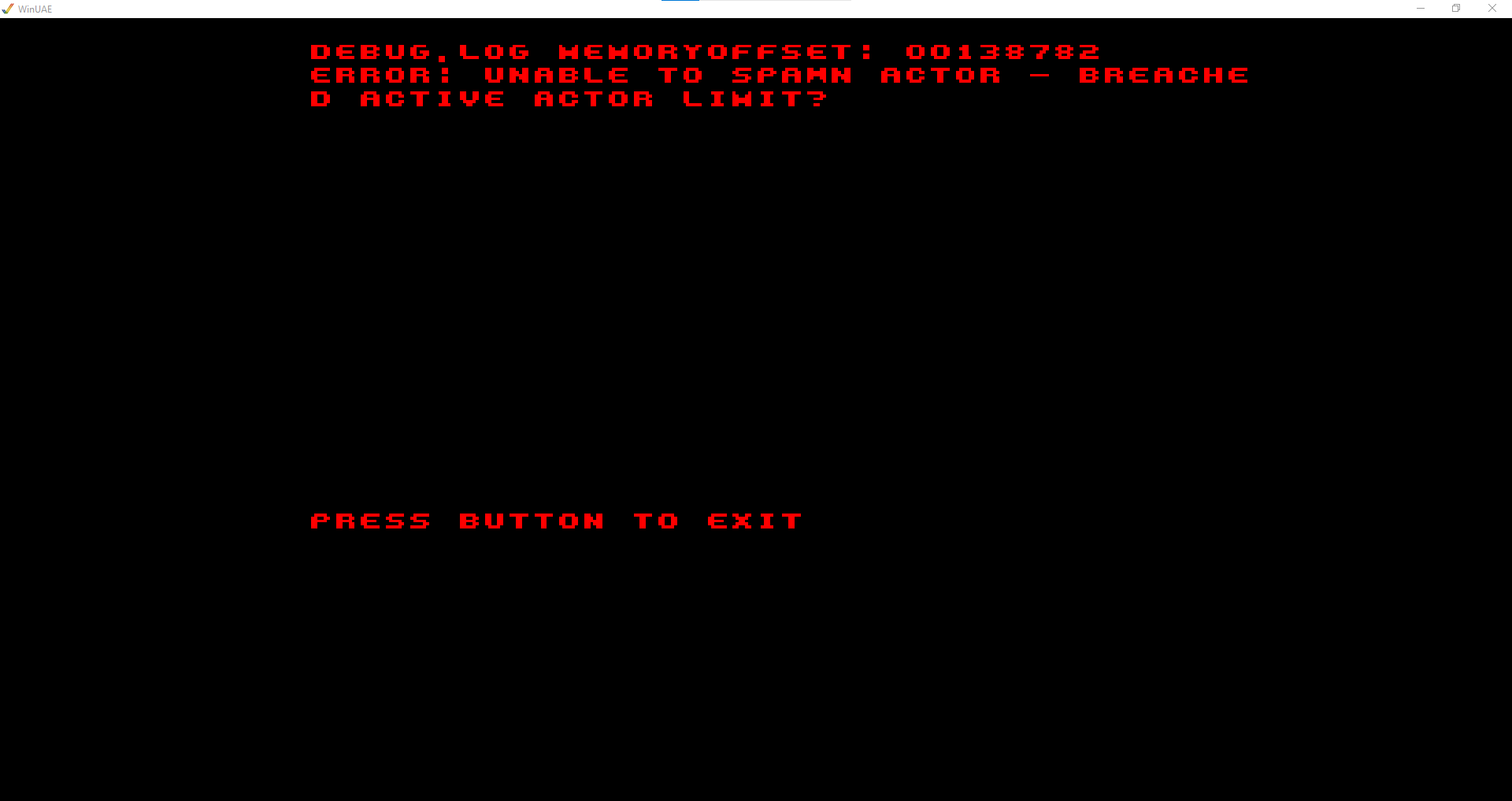
Also, the game crashed and showed me this error at the start of level 6
I increased the breach limit from 48 to 64 (based on your screenshot) .
The more it's increased, the more memory it consumes, so it must be done gradually.
The medusa should be fine too now, please try again (I've just uploaded the updated ISO).
I just got this error, also in stage 6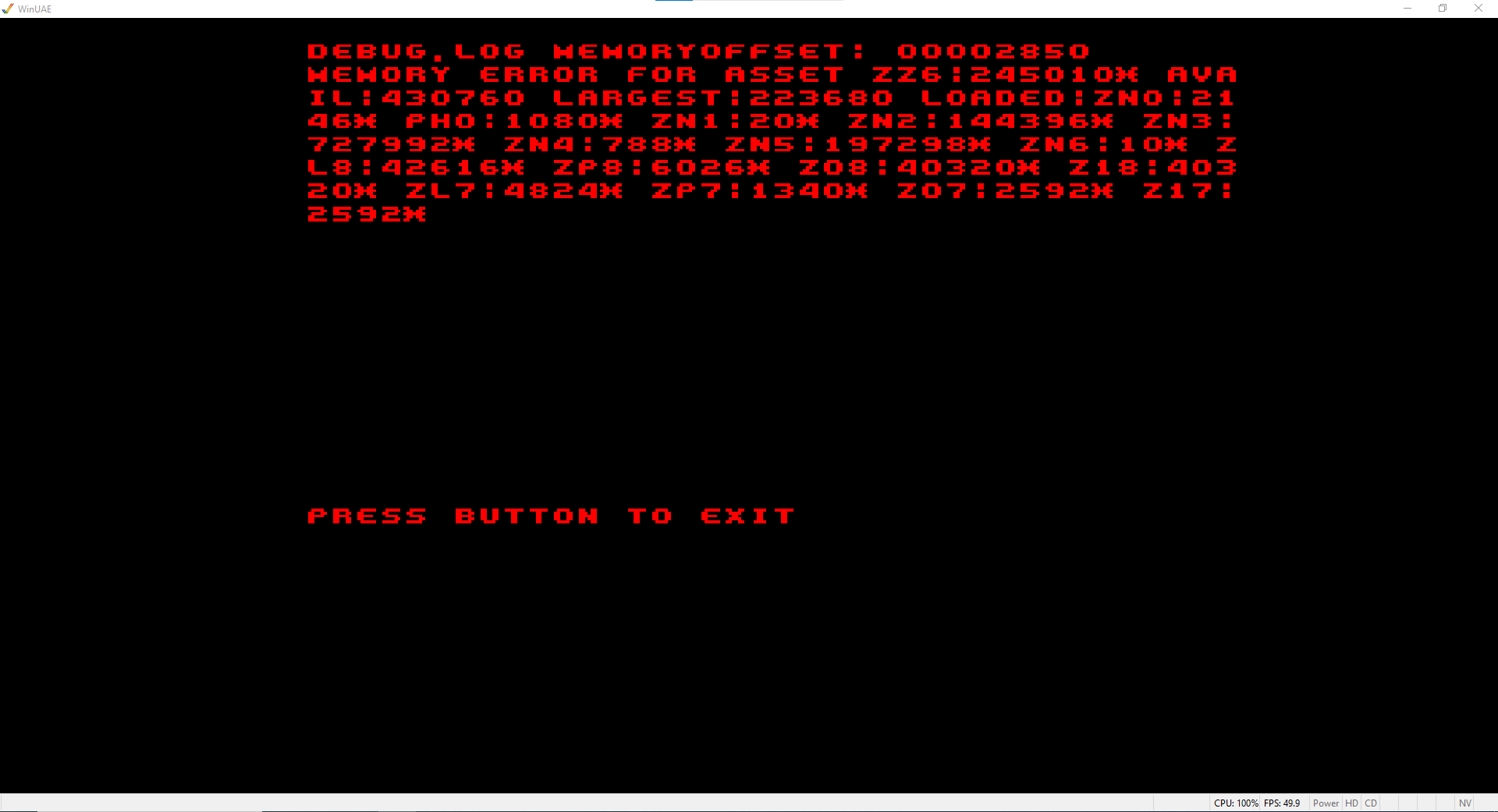
Ok, the 'asset ZZ6' code on your screenshot means that a map asset wasn't fitting in memory (due to fragmentation). The course of action was unload all asset bundles between stages, according to the guide and advice on the engine's Discord.
I gave it a shot, please try again (updated ISO). At the moment, I unloaded the assets between levels 5 and 6, because it's where the memory is getting fragmented to the point that the asset isn't loading. But I will ask there if it's recommended to do that between all the levels, which I'll do if the problems persists. Thanks again.
こんにちは。
I could not run the WHDLoad version on my real A1200 ( 060 ).
I tried CastlevaniaAGA.lha, I could run it, but need to boot w/ minimum startup of the OS. How much chip memory will be needed?
Here it works directly after reboot, I mean, if I run something else before (like Dopus for example), then it fails to run. Memory got fragmented. FBlit program on startup-sequence used to help a bit.
This is also a good gauge - the amount of RAM that the Amiga CD32 version uses:
"Accounted memory total: 1841882"
That version works on the stock machine so that is about the amount needed. But the CD32 has no Workbench booting up and getting in the way, so that's part of what makes it possible.
Hi Dante, Many Thanks for Your latest Update (31/10/25).
Under WInUAE all works correctly with a nice new intro....Many Thanks for That.
The same version (WHDLoad) on my Real A1200 has a problem...
On the Main Menu, when a want to press fire nothing happen,...
I can change to position from start to option but when I want to press fire ...nothing happen.
After Many test, I finally found the problem ...
I used a Tom+ adapter with dual possibilites to use a modern USB PAD (Logitech F310) and a Josytick DB9 competition Pro ...
Usually I can change on the fly by press fire to choose my Pad or My joystick...
Here in Pad or in Joystick position ... Nothing works even if I select the pad or joystick BEFORE launching the game.
This adapter is CD32 compatible and I use it all the time for all other games and it work (WHDLoad or ADF Files)...
Please could You have a look to find a solution to my problem...
In previous versions my adapter worked correctly with Your Game.
Many Thanks, Pascal
Hi Pascal, thanks, I reported it to the Scorpion Engine Discord (screenshot).
Hi Many Thanks for Your report... I Hope that the creator of the scorpion Engine will find a solution with that adaptator because Your game is verry Nice... This adaptator USB to DB9 is compatible as CD32 PAD. I used the latest WHDLoad 19.2 and the slave included in Your Package.
Edited :
Have a good day,
Pascal
Earok did a tweak on the engine to attempt to make it more compatible to third party joystick adapters, here's the link for a new test version of the game:
https://www.mediafire.com/file/ipyh2eq2k0ji3zz/CastlevaniaAGA_attempt_joystick_f...
WHDL: https://www.mediafire.com/file/bcm95k21czua508/CastlevaniaAGA_WHDLoad.lha/file
Hi,
Many thanks for Your answer and Your Fix... Now all works correctly with a 3rd Fire button...
It works perfectly with my PAD Logitech F310.
I am really happy that the third fire button will be available on all future versions of the Scorpion.
1) There is a problem with the Intro... The intro Start correctly but on the 2nd screen, The text scrolling speed fluctuates, The text on the screen appears to be flickering and the sound becomes less consistent, then the screen goes black and nothing happens, without returning to the game's demo mode... which allowed launching the game using the Fire button. After this problem, I have to reboot my A1200.
My setup is A1200 GVP A1230 Turbo+II @40 MHZ + FPU with 32 MB Fast Ram.
Tests were also carried out under WinUAE 6.02 Beta 5 (64 Bits) with the same GVP A1230 Turbo+II card (emulation) and the same results were obtained.
2) Under WHDLoad (Slave included in the archive) about the QuitKey function: it's stopped working again. As QuitKey, I used QuitKey=$46
I also take this opportunity to congratulate you on the very high quality of your Scorpion engine.
P.S. : same report posted in HOL Scorpion Forum
Regards,
Pascal
Thanks for the report. Glad now that your Tom+ adapter now works. Can you please check if the text scrolling speed fluctuation happens with the LHA build too or only the WHDLoad? It was also happening in the previous version of the game that didn't supported your adapter or is this a new issue? Thanks again.
Do you consider an ECS release?
ECS, if you mean as 1.5 or 2MB chipRAM A500/A600, then it's not impossible.
But OCS as in A500 512K chipRAM, then it's quite a problem: back then we had great looking games for it but people complained they lacked depth/gameplay.
Memory was such a bottleneck that sometimes they weren't able to even fit in-game music, let alone some varied and complex levels and bosses. CV AGA soundtrack alone is nearly 1MB, MOD music takes a lot!
For me OCS/ECS is not limited to 68000/7 and 512/512 KB, so yes, 2 MB ChipRAM and > 020 is pretty ok for me. I would love to play CV on my A2000.
You might want to consider changing the included emulator for PC, it appears to have input lag and rendering issues.
It's the engine's default output, I don't have access to change. It's well known how fiddly Amiga emulation is to get right, but Inglebard was able to record/play it properly after a ton of tinkering:
Oh... :<
Any potential for a more dedicated PC version, or maybe Genesis or 32x version?
I did a new emulator config with another way for remapping commands (native emulator mapping is Right Ctrl for fire button and something else non-standard, that's why I did the remap which may cause lag). Try downloading again, it might be improved in that area with the changed config file. It's on CastlevaniaAGA_Win64\FS-UAE\Configurations\Default.fs-uae so you can edit and alter mapping if you use a controller and want other button maps etc.
About Genesis, I was told (by contact working for the IP holders) that, as long as it's on a niche system like Amiga, I'll be fine. If it goes to modern PC or even the popular Genesis, there could be legal scrutiny. New Genesis games are made into cartridges by the Chinese to be sold by the thousands at AliExpress, so, money involved = big problem. But, I could do a Genesis game with original IP using this codebase or parts. ;)
> But, I could do a Genesis game with original IP using this codebase or parts. ;)
I'm interested in this.
But, well, Konami isn't TOO strict... There's odd cases, like that one guy in Canada who sells his fangame remakes and claims to have Konami's permission to do so, or the case of the Castlevania Unreal remake that got hit with C&D (though Konami later lifted it to allow the dev to update it as long as he doesn't add content), overall they don't mind fangames.
very good
Works on my A4000/030 now with October update :D Nice game with great gfx , very good music and sfx. Have some slowdowns when it get crouded or there are big objects. Seams like this game might require 50MHz or something to play smooth all the time. Maybe a 25hz option for slower hardware? I also wish 2nd button could be used for special weapon. That way up would be for jump but that is what I like anyway.
Thanks! Glad to hear that it works on A4000 now. That's a neat suggestion about 2nd button, I did this quick version for testing. If you enable up for jump on the menu, the second button automatically defaults to special weapons:
https://www.mediafire.com/file/e22e9k7zq0eraw7/CastlevaniaAGA_WHDLoad.lha/file
About speed, for the stock CD32 at ~14MHz it's using a method that adds performance/extra bandwidth but in exchange you get the screen off center.
You may see many Amiga games from back then (Fire & Ice AGA) or recent (BD vs Dragon Ninja AGA) with off center picture. I personally prefer some slowdown here and there - even NEO GEO games have, it's part of the experience - than oddly off center screen. :) But here goes another version for such testing w/ the method enabled:https://www.mediafire.com/file/qgwd1v0w2mnsm9x/CastlevaniaAGA_WHDLoad_offcent/fi...
Thanks :D So much better to play now with 2nd button for special weapon. The off center version is for sure faster but seams more buggy on my A4000. Got a whd-load error after dracula boss fight.
I think I fixed the Dracula issue. Because the game was reloading that level 2x after player respawn. Also yesterday I improved the hitbox on Dracula's head (was way off), so you might want to download main version once again. It may be too easy to hit Dracula now... so hard to balance. Anyway, here goes the "off center" faster version with Dracula fixes:
https://www.mediafire.com/file/vhph7kc4jws3boz/CastlevaniaAGA_WHDLoad_offcent/fi...
Further tweaking (November 04), please download again: https://www.mediafire.com/file/4792nt8vour8a9a/CastlevaniaAGA_WHDLoad_offcent.lh...
Thanks! Testing now. Problem, nothing really new but using 2nd button it suddenly stop working. If I quit and look in the menu I can see the controlls changed. When I first play I select up for jump and other options off. I will try dracula level after dinner.
Dracula fight works good now :) There is a problem with how the action buttons work. 2nd button for special weapon but 1st action button also enable special weapon. I made a video so you can see.
This is strange : the last version doesn't recognize my pad buttons (this is a KTRL CD32 one). On the screen menu I can move the cursor but it doesn't recognize any fire button. I had no problem with past versions.
Tested on an A1200 with blizzard 030/50
Thanks for reporting. Was it WHDLoad version or standard LHA one?
Anyway, please try the version in the link below, it was compiled with SE from September (the latest available as of September, 20).
https://www.mediafire.com/file/xav42dqmweeqxhl/CastlevaniaAGA_WHDLoad.lha/file
Hello Dante. Earok have been asked about the bug on eab. He investigated the engine and fixed a couple of them. Maybe it could benefits your great game ?
https://eab.abime.net/showthread.php?t=97450&page=172
Yes, the issue with 3rd-party joystick adapters I'm on it, I uploaded a preliminary test version here:
https://www.mediafire.com/file/ipyh2eq2k0ji3zz/CastlevaniaAGA_attempt_joystick_f...
Thanks!
Same issue here, using a KTRL CD32+ controller.
hi, please, can you share the new Amiga Mini version .lha of Castlevania? thank you!
Sure, below.
https://www.mediafire.com/file/ycft9wj2b8j9eb5/scorpion_dev.lha/file
hi, did you released a new version of the game for the Amiga mini and emulators too or only for Amiga CD? If you releases an amigamini version too, please can you provide the link? thanks!
I have some problems with Your latest WHDLoad version (15/08) on real Hardware... at The Start screen the fire button doesn't works and I have a screen error write in Red. With a previous version I didn't Had this problem... Could someone can confirml this problem. Under WinUAE I don't have the problem.
It did finally worked for user 'gmeista' here in the comments below (real hardware, A1200/TF1260) but then it stopped working for you... It was a long thread but I suggest the NOMMU tooltype trick which may play a role in making it work on real hardware (specially on MMU-equipped accelerator cards, it seems). Alternatively, you could get rid of those Preload ones (it helps on certain setups).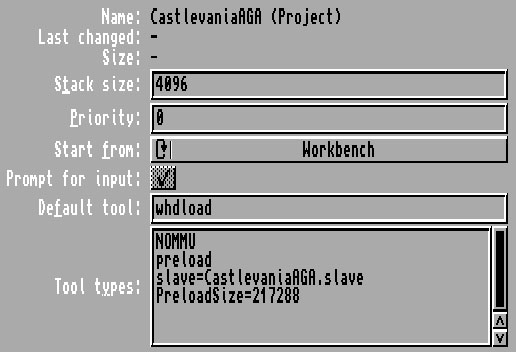
is there a way to save your game progress?
Can't wait to play the last version as soon as I come back from vacation.
Did you ever tried to have Konami's blessing to publish a boxed version ? It would be great !
very good
I've never played any of the castlevania game but this has made me want to jump in. It's a fantastic achievement and good to see AGA hardware getting some love.
Regarding the controls, the shoulder button doesn't seem to work. I'm running it via an emulator but I tried the controller test on Metro Siege (demo) and all the buttons are mapped correctly.
Thanks!
Regarding the shoulder button, I just checked, it's mapped it seems (screenshot of editor/controls mapping attached). It's also mapped to CD32 green button too, just in case.
If you tried FS-UAE (PC version), the controls mapping could vary indeed. In that case, you can go to \CastlevaniaAGA_Win64\FS-UAE\Configurations\Default.fs-uae and change accordingly (where joy_1_fire_button is attack, action_key_z is jump and action_key_space is sub-weapons).
Hi, I'm using an A1200 with TF1260. I get The error shown. I'm using the primary version unarchived onto the SD. Any ideas?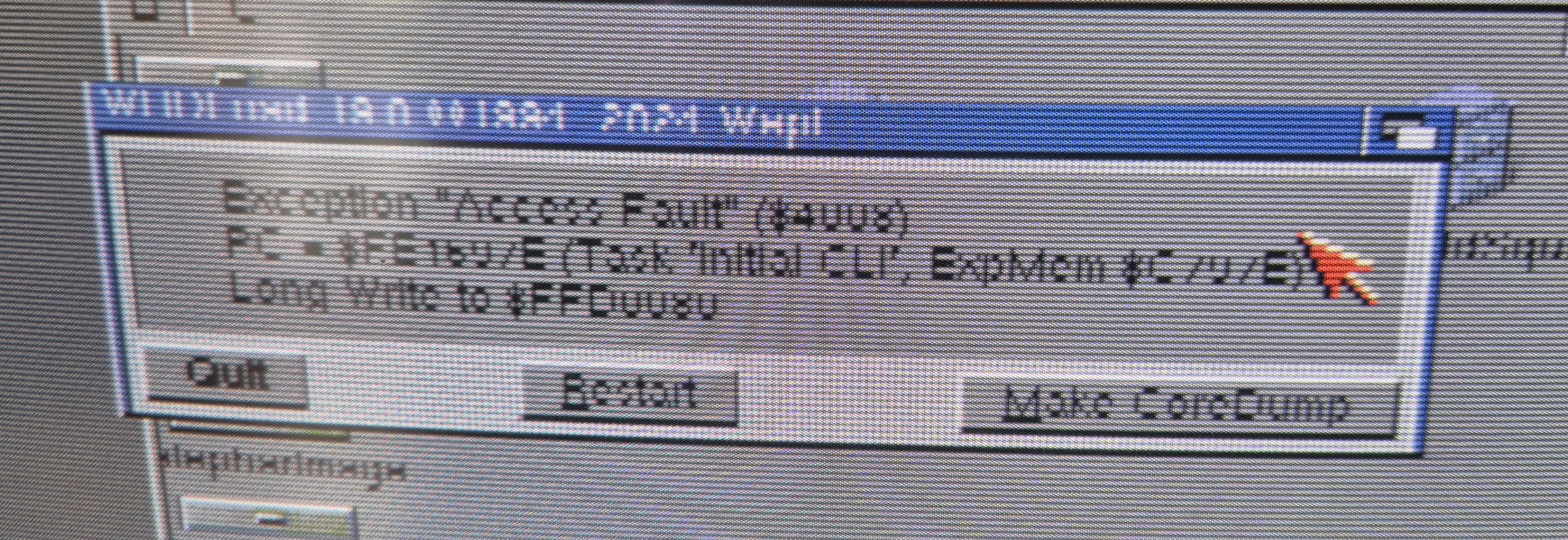
This is probably low chip RAM, happened on AmigaBill's stream last weekend (I think he has TF1260 card too). What he did was to lower the Workbench to 4 colors or similar, to free chip RAM.
It worked for him, but the only way to make sure is to unarchive the *LHA* version onto the SD and run game.exe through the boot without startup method (there's a mini "tutorial" for that below the download links). Thanks.
Hi I'm trying this, but game.exe doesn't work. it is an unknown command. There doesn't seem to be a game.exe file in CastlevaniaAGA.lha, only CastlevaniaAGA, cartridge.se, and CastlevaniaAGA.info
Try the one in the link below, it has game.exe and also game-crunched.exe (both should work):
https://www.mediafire.com/file/7gkeq3zzmmccveo/CastlevaniaAGA.lha/file
OK thanks, I tried this now, I get the Scorpion Engine logo, then a loud "beep" tone that does not stop! This is the same whether I load game.exe or game-crunched.exe
Ok, please try the one in the link below, I disabled the preallocate memory option, you can click on the game icon normally:
https://www.mediafire.com/file/c46p3h9mu2twdmv/CastlevaniaAGA.lha/file
Todd, who also has a TF1260 card, succeed in getting it to run: https://x.com/ToddsNerdCave/status/1948986038535282775
thats such an awesome work you did so far , just one question ..when you done with the amiga version .... any plans to port it to one of the other systems that handles the scorpion engine ? or wouldn't that be possible ? it seems to be a pretty intressting retro engine for that reason alone
Thanks, it's always a possibility. I also got other projects that may target primarily the other platforms covered by SE (NG, MD). Such as one that I was doing in SGDK long ago. As a rule of thumb, it's always better to make a game 100% tailored towards a certain system, because they have all their different pros and cons. Even with modern tools helping, to make multiplat tend to lower the bar for both, as the result is an average between both systems. Rather than one that exceeds in one system.
sounds great and sure the games should be optimized for each system ...you can be sure i follow your stuff ..that castlevania version is just getting better with each version
Seems like the CD32 version didn't get an update. Will there be an updated version as well?
Hopefully, after everything is sorted out in the standard version (which is still in "quarantine", so to speak). Updating both versions at the same time led to undesirable results.
hi, thank you for this new update! Well, is it available the AMiga Mini version too, as usual? thank you!
I think that the primary WHLoad version works on the mini too. But you can get the usual scorpion_dev.lha from the link below, just in case. Thanks!
https://www.mediafire.com/file/7faf8gtx3iblmjt/CastlevaniaAGA_July2025_Mini.zip/file
thank you very much!
hi, sorry just one question: did you release an additional new update some hours ago? Or is it the same update released 2 days ago? thanks!
Just testing a minor thing. Doesn't need to re-download. 👍
thanks! :) Do you think you need to release new update or is it complete? thanks!
Sure! For example, the music isn't complete yet - Out of Time (world 6) is missing 2 patterns at end, among other small things and missing hidden items on the levels.
Thank you again for this gift for Amiga's 40th anniversary. This game is one of the best things the Amiga AGA has to offer. Keep making us dream. My current passion is creating video game icons, so I just have to create this one.
Looks fantastic, thanks! I've received many icons along this development cycle so I need to add a directory in future releases with all of them, as a fair move. I can't pick one and use as the default icon for the game because I may be accused of favoritism. :-D
About Your latest information :
CastlevaniaAGA.lha - Try this one if you're getting an error on the WHDLoad vers
I'm getting back to you about the latest lha published on 07/25 with the files at 8:31 p.m.
If we integrate these files into an existing WHDLoad installation (your) by renaming the CastlevaniaAGA file (210,140 bytes) in the DATA directory to load_whd and then launch your WHDLoad slave, in that case the QuitKey no longer works. Will You update Your WHDLoad installation too ?
Edit: I just followed your suggestion and it worked, so I've updated the WHDLoad one in this site. Thanks!
Some extra info:
The issue was reported first by Todd Gill, using an A1200 + TF1260 card.
I can reproduce the error in UAE with the "Fastest as possible" option enabled (screenshot). It occurs right at start after you double click on its WB icon.
But if I use "Approximate A500/A1200 or cycle-exact", with Cycle-exact (full) and Cycle-exact enabled in Chipset tab, the game loads and works correctly.
Awesome!
Thanks. Beautiful video quality, keep up the great work! EDIT: Btw, noticed a minor issue (03:15 of vid), end of stage panel should look like screenshot below. What was config used for recording?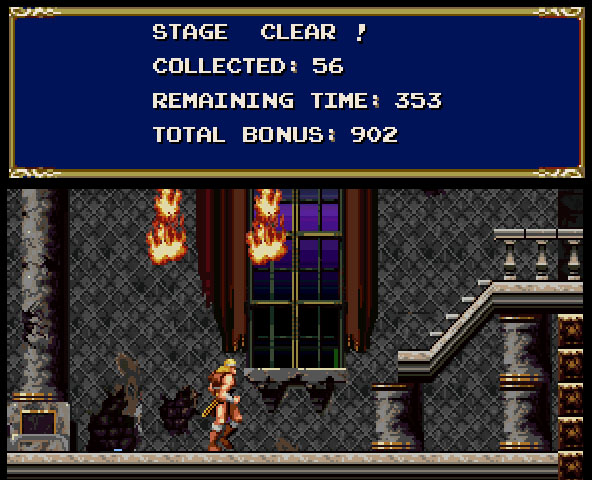
This version finally fixes the crash issue in World 5 and looks even better. The music has also been reworked. We've adjusted our rating accordingly. This game deserves nothing less than the highest rating. 👍
Thank you very much! Your tests were important for solving that issue. I've updated the status from alpha to beta (about version 0.95) here on this site. I'll be still working on it towards version 1.0 (still a few edges to polish).👍
Hi,
Thank you very much for your words. I've updated its status from alpha to beta, among other things. For gold/release, I'd like to add modifications to the intro screen, final versions of the music (IM76 told me that the final boss music still uses placeholder instruments and DJ Metune's Out of Time track is still missing 2 patterns), refinement to enemies' behavior and more performance optimizations.
very good
Thanks for making a PC version!
Hello. Just tried the WHDLoad version on an A1200 3.1 - 030/50
On the 3rd lever, as I spawned, it just took me to the most left end of the level. A jumping skeleton was there on the wall. I was invisible but could through some daggers with space. Couldn't do something else.
Try pressing F3 on keyboard to reload the level if that happens. The camera 'unfollow' player and goes to position ~0,0 on the map, it's a known issue. That issue isn't happening anymore on my internal version running on SE 2025 and I plan to update to that one end of next week if all goes well. Thanks!
Thank you for the answer and not itch as it didn't notify me about this msg.
Hi Dante, how are you ? ^^
What's new about the Scorpion 2025 version? Not too much of a hassle? :)
Polishing and better use of capabilities (like 24-bit gradients, channel reserved for SFX avoiding clipping over music and so on).
Wow, oh yeah, really! Crazy work, it's really impressive 0_o
How many percent of this CD32 version are you?
Thanks. CD32 should include most of the improvements shown. If all goes well, there'll be something to test next week.
:-o cheers !!!!
Hello Dante, do you have any updates for this wonderful game?
Yes, I'm working on getting it on Scorpion 2025. The main reason is to solve the CD driver issue that plagues CD32 version, but many other improvements will be seen in next update, such as better color conversion shown below (through in-game palette swap). Thanks.
Hey there, I hope you don't mind, but I featured Castlevania AGA in the top 100 Amiga homebrew games of all time.
Top 100 Amiga Homebrew Games
Thanks! :)
:)
I tried both WHDload and HDD version and the game crashes at level 5. I use WinUAE. At startup I have 1936928 bytes of Chip RAM and 128MB Fast RAM free.
Try the version below, it's running on a newer version of the engine that enables more entities on a level (that level is too crowded and breaches the older engine's limits). But it also has new issues on other areas. I'm working on it. Thanks!
https://www.mediafire.com/file/5spwxb6c8pagnhg/CV_AGA_new_engine_version.zip/fil...
This version is funcion. Thanks :-)
Thanks for reporting. This is probably due to RAM, because as a challenge, I tried to shove a ~3MB game into a 2MB machine. :)
The TF card helps, but it seems to bring other engine-related issues (as I've watched similar reports from the other Scorpion Engine CD32 game released, SW Holiday Special).
Well spotted about the weapon fire on button release, it should be fixed in the build below. I also disabled preallocate memory to see if it helps with the stage crashes/black screen. And added a cheat to help your testing: "green" on CD32 pad will fill your health bar when pressed:
https://www.mediafire.com/file/pk27k6367onrj0b/CastlevaniaAGA_CD32_ISO.zip/file
- Fire on button release : fixed
- Crashes/black screen before or after the second boss : seems to be fixed.
think you can fix it ?
The visual glitches and non-playing CD music are engine related. Similar issues were reported on SW Holiday Special released by the engine's author himself. All I can do is to switch engine versions until it's mitigated or solved. Meanwhile, I did the version below using a different version of the engine, to fix a problem that appears on world 5 (it worked). It is not CD32, just normal A1200, but you can play that as well if you have a TF card on your CD32. Thanks.
https://www.mediafire.com/file/pk27k6367onrj0b/CastlevaniaAGA_CD32_ISO.zip/file
Hi, could you please include most of the soundtrack of Castlevania of Sharp X68000. It seems to me very inconsistent the music style that has the game. The first stage song is taken from the X68K version, but from the following stages they have a soundtrack whose music style does not match with the first stage.
Hi, not sure if you're talking about standard version or CD version. Standard version is incomplete atm, music-wise.
However, the CD version can be modded, so you can download your favorite Castlevania tracks and do a replace-and-rename job in its folder to create your own custom playlist. The current track list is described in this post.
It supports MP3, WAV and FLAC formats (but you have to edit the CUE file accordingly, check screenshot below). If you use emulator, make sure to load it by the cue file, otherwise it'll ignore the CD music. If you burn a CD to play on real console, make sure that the burner you use supports the music format that you gonna use (people recommend ISO Burner which is free, and to burn at slowest speeds).
Thanks!
I am referring to the standard version.
Ok, but please check how the standard version rendition of Wicked Child sounds and how it sounds on the Sharp X68000 - it's quite accurate to me.
Only about 3 main songs are actually "real" on standard version: Vampire Killer, Stalker and Wicked Child. Stalker isn't on the X68000 (you won't find a way to compare). Walking on the Edge, Out of Time and the others are placeholder, until DJ Metune (new musician) finish them. This takes a lot of time to do and require special knowledge because the Amiga has only 4 channels while the X68000 has 8 FM channels + 1 ADPCM. The Amiga costs $599 at launch while X68000 costs $3000 - different price ranges for different market niches. Thanks.
Hey Dante! Trying to get Castlevania AGA running on an Android, using Retroarch. I cannot seem to get the music running. Using PUAE core. Any suggestions? Really cool game.
I assume you're trying the CD version, so there is this post on Reddit. But I also recommend to get the standard version (Castlevania AGA HDF which is probably the simplest on RetroArch, because I've read that WHDLoad and LHA versions need extra libs). To get CD music going on emulation is really tricky, not all emulators have full support for CD games and I have experience only with WinUAE and FS-UAE. The standard version uses Amiga PCM chip music instead and should work without hassle. Thanks for the message and have a great Sunday!
Thanks so much. I went with the AGA HDF and it works like a dream. It is just as enjoyable. Thank you
Do you plan to release a cd32 castelvania aga with Flac track instead of mp3?
It's already compatible with FLAC tracks. Both MP3, WAV and FLAC already work (on emulation). If you have a FLAC track in hand, you can do the following: